Redirects and missed pages
Keep visitors and search engines on the site when an address changes. Send an old address to its new page, let the site add a redirect by itself when a page moves, bring the redirects of the plugin you used before over, and see which addresses people ask for that lead nowhere.
Everything is under EtchwpKits → SEO → Redirects. A row of numbers on top says how many redirects there are, their visits in the last 30 days, the missed pages and the redirects made for you. Under it, three views:
- Redirects: each old address and where it now leads, with how often it was used.
- Missed pages: addresses people asked for that do not exist, each with the page it looks like.
- Settings: what happens when a page moves or goes, slashes at the end of addresses, the log of missed pages, and starting over.
A redirect works the moment you add it, for visitors and for search engines, and takes the place of the Not found page at that address. Redirects are part of SEO, and have a switch of their own under Parts of SEO.
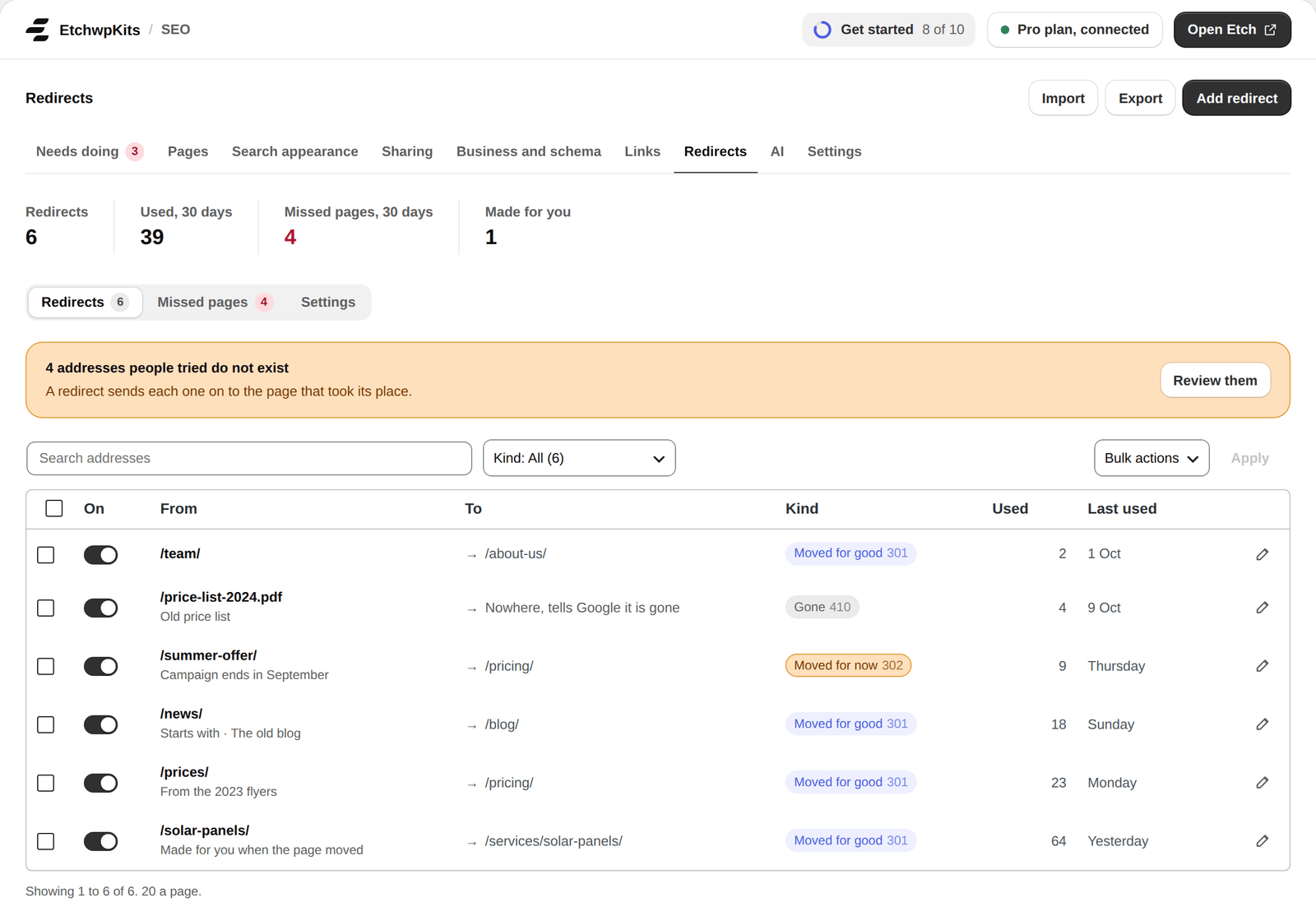
- On: switch a redirect off without deleting it. While it is off, visitors are not sent on. Switching it on again checks that it sends nobody round in a circle.
- Under each address, what it is: Made for you when the page moved, imported, how it matches (such as Starts with), or its Note, why the redirect is there. The search finds notes too, and CSV files carry them.
- The list shows 20 at a time with pages. The search and the Kind choice (Moved for good, Moved for now, Gone, Off) sit on one row. To shows where each one goes with an arrow, Last used when it was last used, and every column sorts.
- Tick redirects and use Bulk actions to switch them on, switch them off or delete them at once. Deleting asks first.
- The pencil opens a redirect to change it, or delete it. Escape closes it.
Press Add redirect, fill in From, choose how it should Match, then To and the Type, and a note if you like.
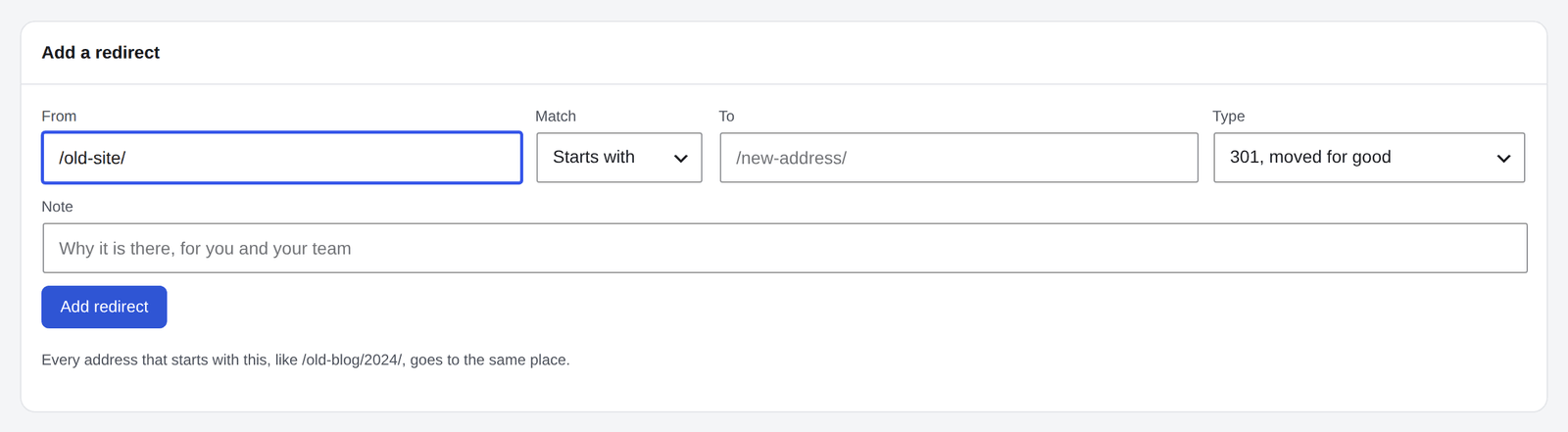
- From is an address on this site, such as
/old-page/. A full address on the site works too and is cut to its path. - To is a page on this site, such as
/new-page/, or a full address starting withhttps://anywhere. Only an administrator can send visitors to another site.
| Type | When to use it |
|---|---|
| 301, moved for good | Almost always: search engines move the old address's standing to the new one. |
| 302, moved for now | Something temporary, like a campaign page. |
| 307 | Moved for now, like 302, and asks the browser to keep its request method. Only page views are sent on (see below), so for visitors it works as a 302 does. |
| 410, gone | A page removed for good. Visitors get your Not found page with that status. No To needed. |
| 451 | A page taken down for legal reasons. Like 410. |
The form refuses what would break the site: a redirect from the home page or from WordPress's own addresses (such as /wp-admin/ or /wp-login.php), one that leads back to itself, one that would send visitors round in a circle through other redirects, a pattern as wide as the whole site, and a second redirect from the same address.
| Match | What it catches |
|---|---|
| Exact address | One address, whatever the case, with or without the slash at the end. /Old-Page and /old-page/ are the same. |
| Starts with | Every address under a path: /old-blog/ sends /old-blog/2024/winter/ on too. |
| Ends with | Every address that ends with a text, like .html. |
| Contains | Every address that contains a text, like old-offer. |
| Pattern (regex) | A regular expression for the path; its $1 to $9 fill into To. |
- An exact address wins, then the longest Starts with, then the other kinds, then the patterns in the order they were added.
- An exact address with a query of its own, like
/shop.php?id=12, sends on only visitors with that query, its parts in any order. Tracking parts likeutm_sourcedo not count and go along. - A query the visitor brings is passed on to the new address, unless To has a query of its own.
- Only page views are sent on. A form or a script posting to an old address is left alone, so nothing sent is lost.
Change a published page's address, its slug or its parent, and the site adds a 301 from the old address to the new one by itself, marked address changed. Every page under it gets its own redirect too, however deep. Blog posts are left to WordPress, which already does the same for them.
- Redirects that pointed at the old address are pointed at the new one, so visitors never go through two redirects in a row.
- Publishing a page at an address that has a redirect removes that redirect, so it never hides the new page. A redirect someone else made is never replaced.
- Move a published page to the Trash, or delete it, and the next screen says its address now leads nowhere, with Add a redirect for it.
Both can be switched off under Settings.
Editing a page in the block editor, open the Send elsewhere row under Edit in its SEO box to deal with this one page's redirects without leaving it. It is there for administrators, while Redirects is on.
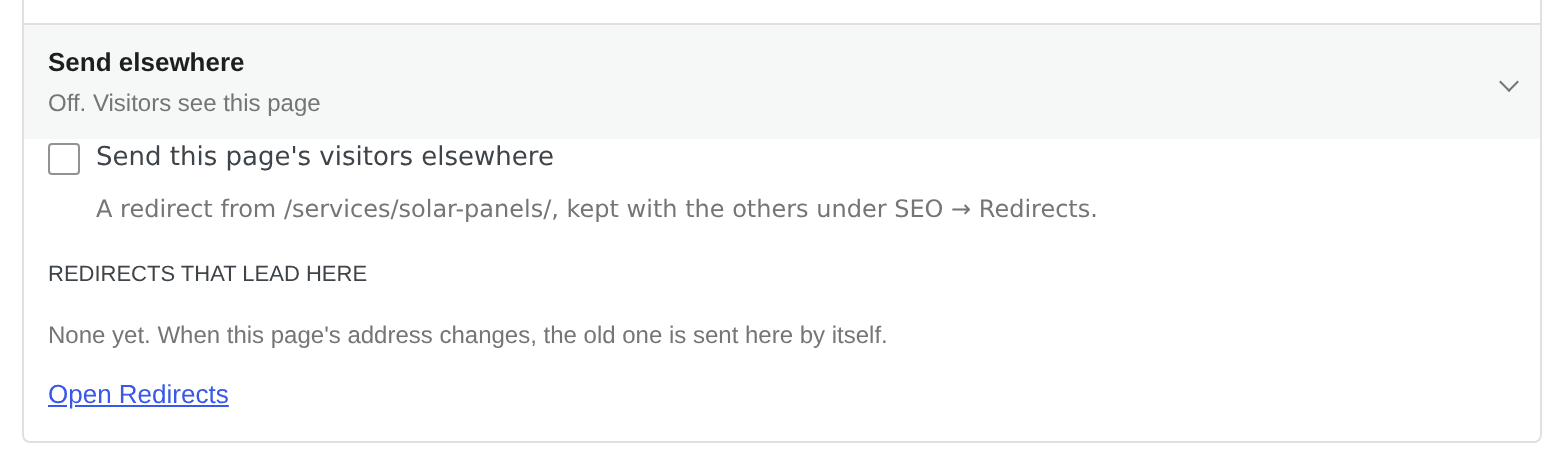
- Send this page's visitors elsewhere makes a redirect from the page's address: 301, 302, 307, 410 or 451. In To, type a page's name and pick it from the list, or type an address like
/new-page/. An administrator can send it to another site too, with its whole address. - Save redirect saves it at once, not with the post. It is a redirect like the others under SEO → Redirects, with its note, and can be switched off or removed from the same row. While it is on, the row says that visitors never see the page.
- Redirects that lead here lists the old addresses sent to this page, most used first, with the visits each sent on in the last 30 days and when the last one came. Open Redirects opens the list.
A link on the page to an address of the site that is not found says so on the Links row, with a way to send that address on: it opens Add a redirect with From filled in.
Export CSV saves every redirect: from, to, type, match, hits, note and on. Import CSV reads a spreadsheet with a line per redirect, with from, to, type and match (exact, prefix, suffix, contains or regex), and if you like a note and on (1 or 0). It reads commas, semicolons or tabs, and the column names other plugins export under.
Before anything is added, the import shows how many can come over, which addresses already have a redirect and keep it, and which lines cannot be one and why. Then it adds them in one go.
Moving from another plugin? Under SEO → Settings → Import, Redirects from another plugin reads the redirects Redirection, Rank Math, Yoast SEO Premium, All in One SEO, SEOPress, Slim SEO, The SEO Framework, Simple 301 Redirects and Safe Redirect Manager kept, whether that plugin is still active or not.
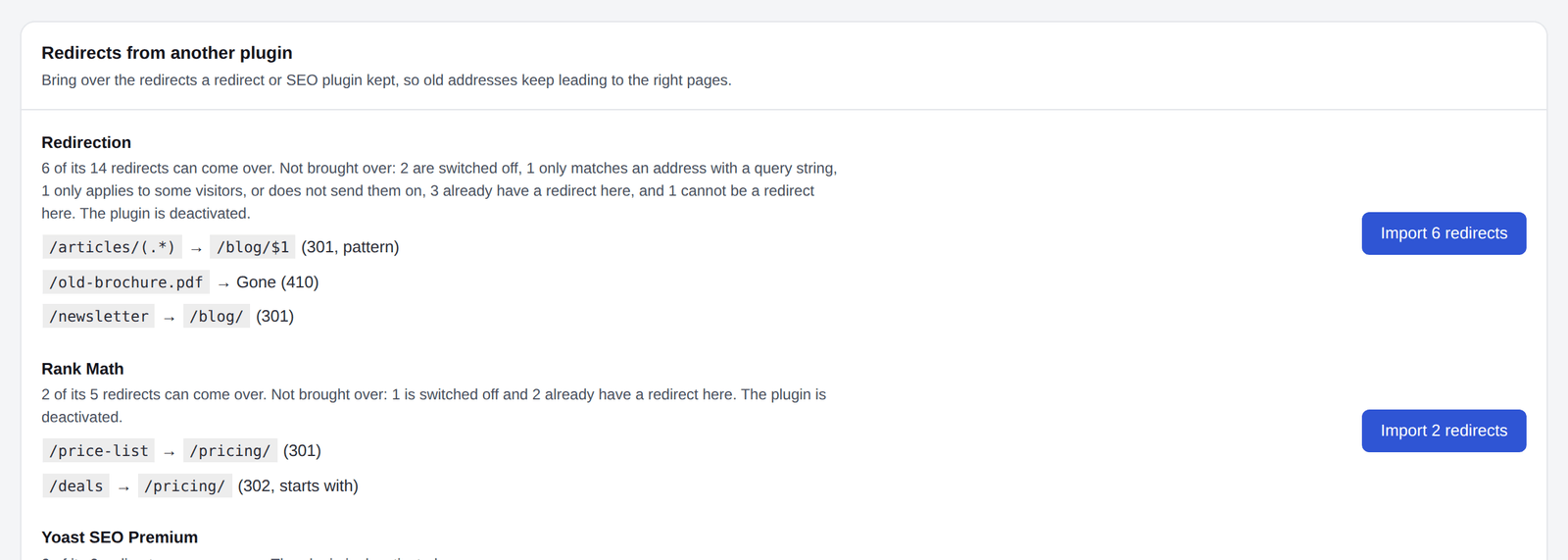
- Each plugin shows how many of its redirects can come over, why the others cannot, and a few examples. Press Import beside it.
- Their patterns come too: regular expressions, "starts with", "contains", "ends with" and wildcards, with their 307, 410 and 451 answers. A 308 becomes a 301, a 303 a 302, and each keeps how often it was used.
- Left out, and named: redirects that are switched off, that apply only to some visitors (logged in, a browser), or that match a query string the plugin had to match.
- Each one goes through the same checks as one you add by hand: an address that already has a redirect here keeps it, and none can lead round in a circle. Addresses on the site itself come over as paths, so they still work after a move to another domain.
- Imported redirects are marked imported, with the plugin they came from, and Remove the imported takes away the ones from one plugin in one step. The other plugin's data is only read, never changed.
Missed pages lists the addresses real visitors asked for that do not exist, with how many visits and when the last came, most asked first. It fills itself. Before plugin 0.82.0 it was called Not found.
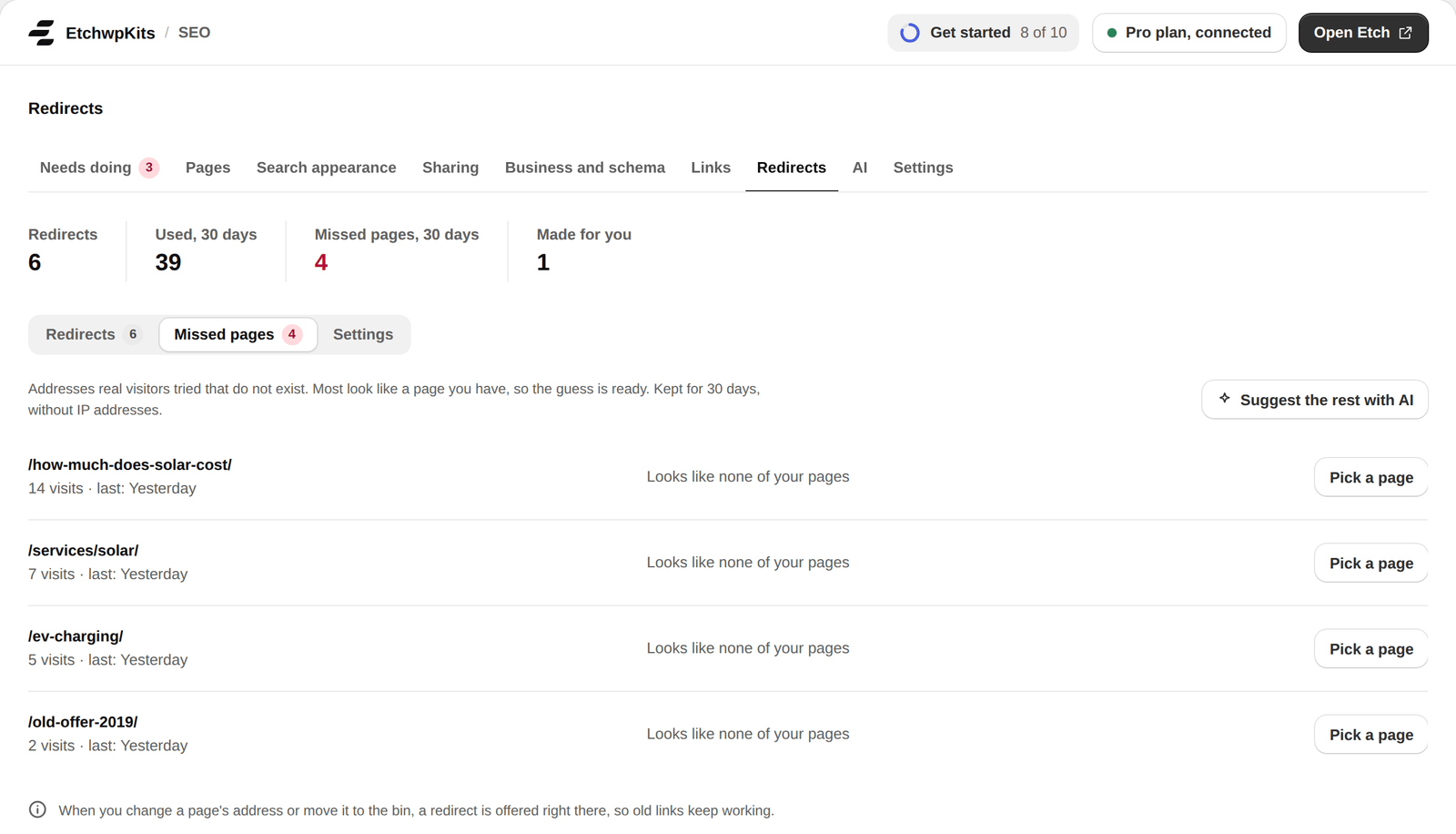
- Only the address and how often are kept: no IP address, no browser and no referring page. An address is forgotten when it is not asked for again in the time you choose under Settings, 30 days unless you change it.
- Requests for files and scans of WordPress's own folders, like
/wp-login.php,/.envor/wp-config.php.bak, are marked None: not a page, with Remove. Bots try those on every site: there is nothing to redirect. - An address leaves the list by itself once a redirect, a page or a moved page takes it.
Each address shows the page it looks like, found by its words alone, at no cost:
- The same last part under another parent:
/team/to/about/team/. - Nearly the same words:
/about-us/to/about/,/contact-us/to/contact/,/services/solar-panel/to/services/solar-panels/.
Redirect there adds a 301 to that page in one click. Pick another lets you choose another page. Where no page fits by its words, the row says Looks like none of your pages, with Pick a page.
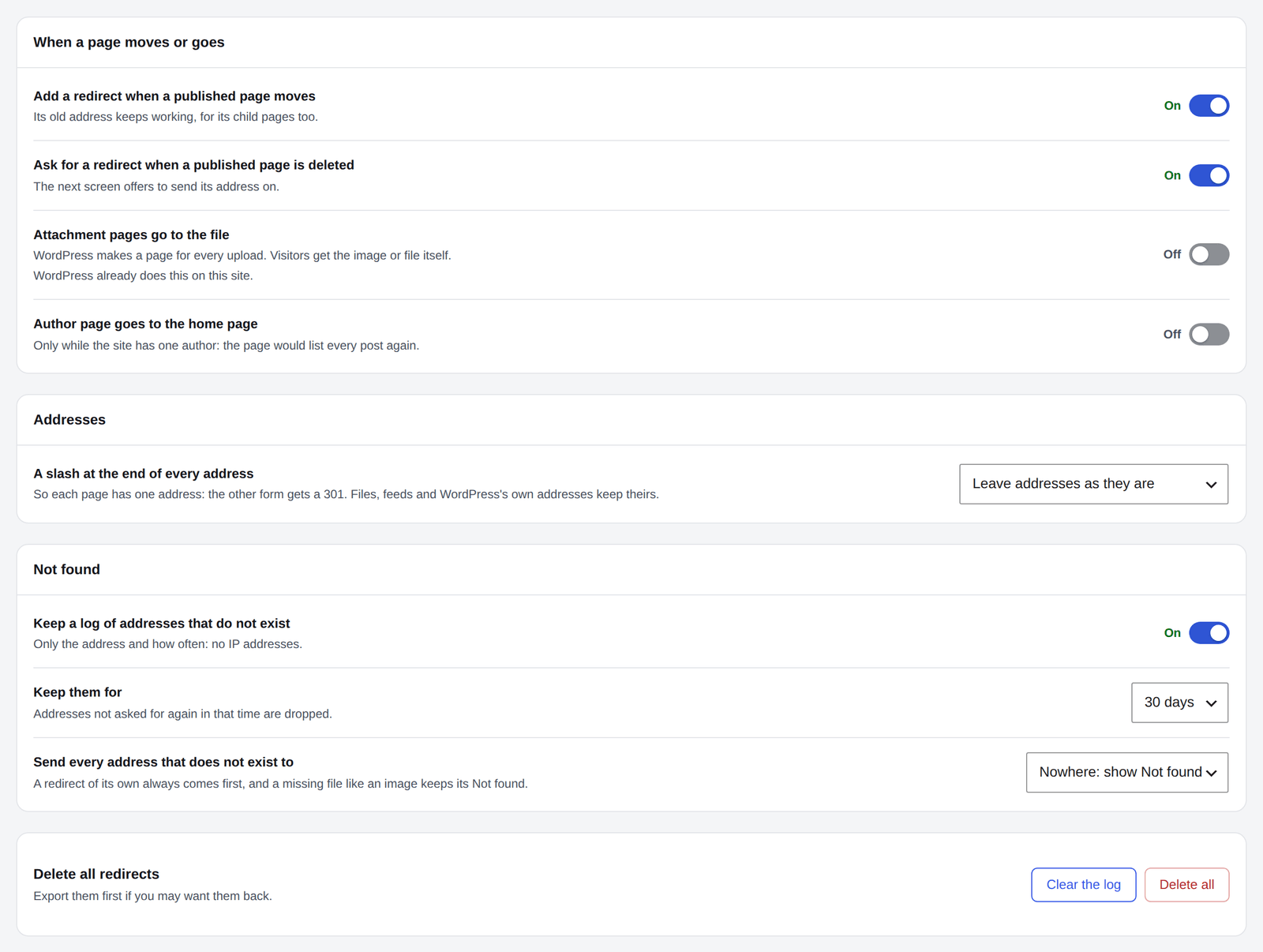
- Add a redirect when a published page moves and Ask for a redirect when a published page is deleted: both on, each can be switched off.
- Attachment pages go to the file: WordPress makes a page for every upload. Visitors get the image or file itself instead.
- Author page goes to the home page, only while the site has one author: the page would list every post again.
- A slash at the end of every address: leave addresses as they are, add a slash (
/aboutbecomes/about/) or take it off. The other form gets a 301. The home page, files, feeds and WordPress's own addresses keep theirs. - Keep a log of addresses that do not exist, and Keep them for a week, 30 days, 3 months, 6 months or a year.
- Send every address that does not exist to the home page or a page you choose, for good (301) or for now (302). Off by default. A redirect of its own always comes first, and a missing file like an image keeps its Not found.
- Clear the log empties Missed pages, and Delete all removes every redirect. Each asks first: export them first if you may want them back.
Changes save as you go. The screen asks before you leave with a change not saved yet, and Save changes tries a failed save again.
- Redirects keep working without a plan, and missed pages keep being counted. Seeing and changing them, and importing, needs an active plan once plans start (see plans).
- While another SEO plugin is active, these redirects wait and nothing is added to Missed pages. They start once it is not.
- AI agents connected to the site can list, add, change and switch redirects, with a note, through AI agents.
- Deleting the plugin removes the redirects, their settings and the list along with the rest of its data. Deactivating it keeps them.