Troubleshooting and FAQ
Most problems come down to a handful of causes. Find the message you see below and follow its fix. Most headings are the exact words the plugin shows.
The panel says: This site is not connected to EtchwpKits yet.
Open EtchwpKits in the WordPress admin and click Connect with EtchwpKits (see Connect with one click). If you just connected, reload the Etch builder once so the panel picks up the new connection.
This site's connection to EtchwpKits expired or was revoked.
The site's token no longer works, usually because the site was revoked on the dashboard. The panel and the EtchwpKits settings page both show this message with one action, Reconnect this site: click it and approve the site again. You can also generate a new token under Dashboard → Integrations and paste it into the Site token field. Then reload the builder.
One-click connect needs this site to use https.
For your safety, one-click connect only works for sites served over https (local development addresses such as .local, .test and localhost are the exception). Switch the site to https, or paste a site token instead.
The connection link could not be verified, or the connection expired
Each Connect link works once and only for a few minutes. Go back to the EtchwpKits settings page and click Connect with EtchwpKits again. The same applies if etchwpkits.com says This connect link is not valid. If you see Too many connection attempts, wait a few minutes first.
Your account already has the maximum number of connected sites
An account can connect up to 10 sites. Open Dashboard → Integrations, Revoke a site you no longer use, then connect again.
Could not reach EtchwpKits to finish connecting.
Your WordPress server needs to make outgoing https requests to EtchwpKits, both to connect and to load the library. Some hosts or security plugins block that. Ask your host to allow outgoing https requests, then try again.
One-click connect is not available with the custom API base URL
A custom API base URL is saved under Advanced on the settings page. Unless you run a staging or self-hosted API on purpose, empty that field and save, then connect. Otherwise, paste a site token.
I cannot find the panel in Etch
Press CtrlShiftE (CmdShiftE on a Mac) in the builder. If Etch's tool rail cannot be found, a floating EtchwpKits button appears instead of the rail icon. Still nothing? Check that the plugin is active, that Etch is active (the EtchwpKits settings page warns you if it is not), and that you are logged in as an administrator.
Your builder session expired. Reload this page and try again.
Your WordPress login in this tab timed out, which happens when the builder stays open for a long time. Save your work in Etch, then click Reload in the message (or reload the page) and log in again if WordPress asks.
A component shows Unlock with Pro
Your account cannot insert that component yet. This does not happen during the beta. Click it to see the plan. After subscribing, close and reopen the panel, or reload the builder, and it unlocks. There is no need to reconnect the site.
The button says Copy instead of Insert
Your Etch version cannot receive inserts from plugins yet, so the panel copies the component (already renamed) to your clipboard instead. Paste it into Etch with CmdV. Updating Etch brings back direct inserts.
Could not copy. Your browser may require https for clipboard access.
Browsers only allow copying to the clipboard on secure pages. Open the builder over https and try again.
Inserted components kept the library class names
No class prefix is set. Add one on the EtchwpKits settings page under Naming convention, or click Set a prefix in the panel's bottom bar for this session. Components you already inserted keep their names; use Clone to make a renamed copy if needed.
The panel is empty, slow the first time, or missing new components
The first open of a session can take a moment, after that it is instant. Click Refresh library in the panel header to pull the newest components, and reload the builder if the panel stays empty.
EtchwpKits could not tell which page this builder is editing
On this page needs to know which WordPress page the builder has open. Open the page in Etch from its row on the WordPress Pages (or Posts) screen and reload the builder. You also need permission to edit that page. Inserting still works either way; only the tracking is skipped.
Could not check for updates just now
The list is shown, but EtchwpKits could not be asked about new versions for a moment. Try again in a little while.
Review update is dimmed
The plugin only replaces a copy it can identify for certain. Hover or click the button to see why: usually the copy was inserted before version 0.14.0, another block on the page has the same class, or the copy was removed or renamed. Click Insert as a new copy instead. See Review update.
The review could not be built
Review update needs the version your page has as well as the new one, and needs to read your copy from the canvas. When either fails, the row says why and offers Update in place, which replaces the whole copy after you confirm. Prefer to keep your edits by hand? Use Insert as a new copy.
My Kits is full
My Kits holds up to 500 saved components and 500 CSS snippets. Delete what you no longer use, in the panel or on Dashboard → My Kits, then save again.
This component is larger than 1 MB
A single saved component can be up to 1 MB, and a snippet up to 100 KB. Save a smaller part of the page, for example one section at a time.
Saving to My Kits needs an active EtchwpKits subscription
Saving new items needs an active plan on your account. Everything you already saved stays available to browse, insert and delete.
That folder no longer exists
The folder was deleted on the dashboard or from another site. Pick another folder, or leave the component Unfiled.
This version of Etch cannot read blocks for saving
Saving a selection needs a recent Etch version. Update Etch, then try again.
The scan could not load any page of this site.
The scan asks your own site for its pages from the server, and some hosts block that. Ask your host to allow loopback requests, then click Scan again.
The uploads folder is not writable, so fonts cannot be stored on this site.
Hosted fonts are stored in wp-content/uploads/etchwpkits-fonts/. Ask your host to make wp-content/uploads writable, then try again.
A family is hosted, but the scan still finds it on Google
The table says where it is still requested. An @import in an Etch stylesheet is replaced from the builder (see Replace the @import in Etch), a link written into the page needs the rewrite option, and an @font-face rule has to be edited by hand. If you use a page cache, clear it and scan again.
Another change to the fonts on this site is still running.
Font changes run one at a time. Someone else, or another tab, is changing fonts right now. Wait a moment, then try again.
A previous font change did not finish.
A font change was cut off half way, for example by a timeout. The plugin finishes or undoes it by itself where it can. If the Font Manager still shows this, make sure nobody else is changing fonts on the site, click Release, confirm, and try again.
The folder of a family holds files this plugin did not put there
The plugin never deletes a file it did not create. Move the extra files out of that family's folder in wp-content/uploads/etchwpkits-fonts/, then try again.
Export and import need the PHP Zip extension
Export and import in the Font Manager build and read zip files on the server. Ask your host to enable the PHP Zip extension.
The matched fallback could not be measured
The font is measured in your browser against a local font. If that local font is not installed on your computer, choose another one under Local font to adjust, or measure on another computer. See Matched fallback.
Contact form emails are not arriving
- Check the spam folder of every notification address.
- On the EtchwpKits settings page, click Send test email. If WordPress says it could not be sent, or it never arrives, your server cannot deliver mail on its own.
- Install an SMTP plugin and connect it to a real mail service, then send another test. See Making sure mail arrives.
Messages are always saved under EtchwpKits → Messages, so none are lost in the meantime.
The form does not show on the page
The contact form is off until you tick Enable the contact form in the Contact form section of the settings page. While it is off, administrators see a note where the form would be and visitors see nothing.
Visitors say they cannot send a second message
Each network address can send a limited number of messages per hour (5 by default). Raise the Rate limit in the Contact form settings if people often share one connection, for example in an office.
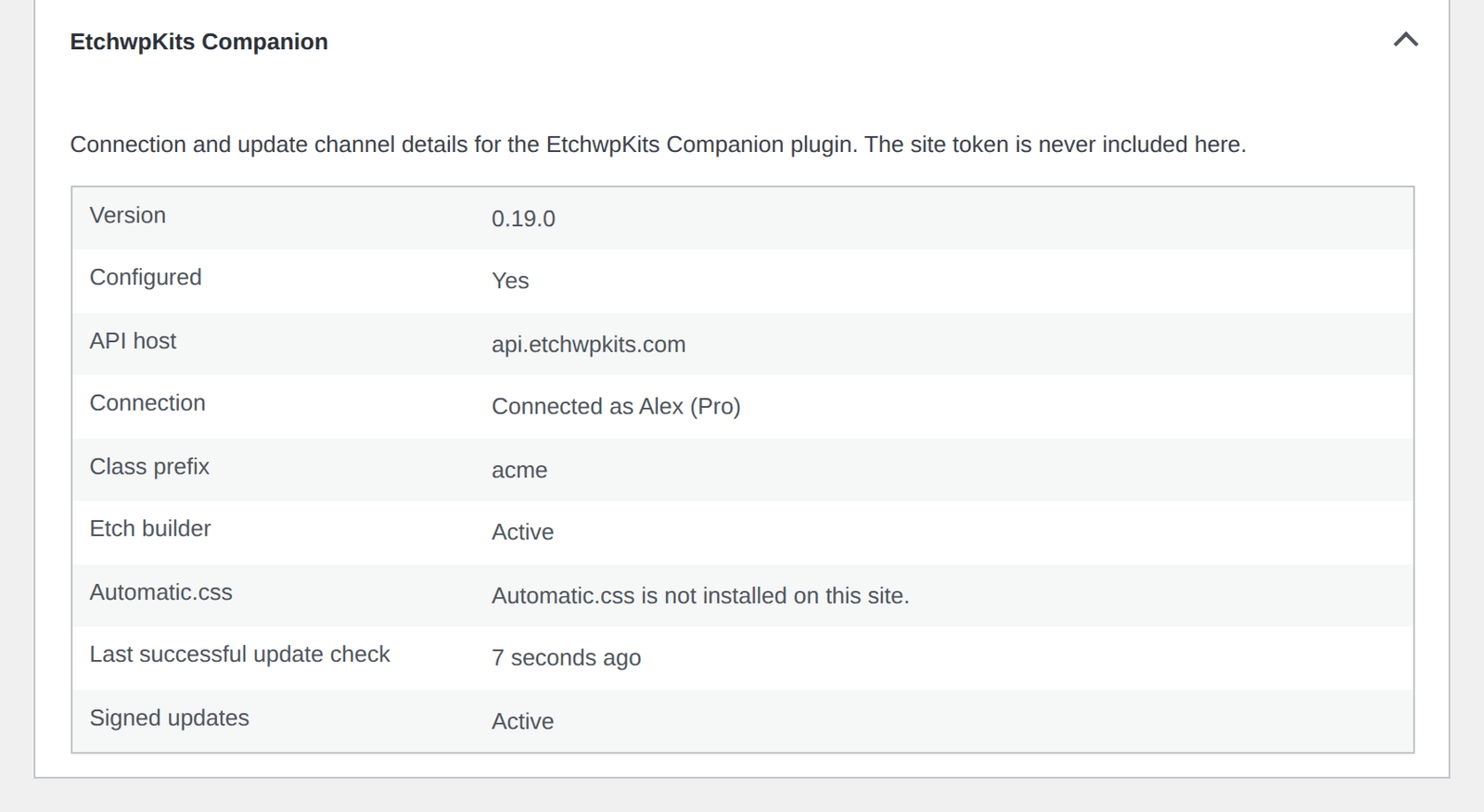
WordPress's Tools → Site Health includes EtchwpKits checks: whether the site is connected and its token still works, whether update checks have been failing for more than a day, and whether the server can verify signed updates. The Info tab has an EtchwpKits Companion section you can copy into a support request. It never includes your token.
Is the plugin free? Will I need a plan?
Everything is free for everyone during the beta. After the beta, the plugin's tools need an account with an active plan (99 USD per year): the builder panel with the library, My Kits, On this page and Clone, and the Fonts tools. Without a plan those tools are paused, and so are the pages you shared with clients, while the settings page, plugin updates, everything already on your site (inserted components and hosted fonts) and the contact form keep working. A paused link shows your client who shared it and nothing else, and it works again as soon as the plan is active.
What do the Free and Pro labels mean in the plugin?
They show how a component is labeled in the EtchwpKits library. There is one plan (99 USD per year), and it includes both Free and Pro components along with every tool, such as Customize, Clone, My Kits and Fonts. During the beta every account can use all of it. If you subscribe while the builder is open, close and reopen the panel or reload the builder. There is no need to disconnect or reconnect the site.
What happens to my pages if I deactivate or delete the plugin?
Nothing. Inserted components are ordinary Etch blocks with your own class names, so your pages keep working exactly as before. Only the panel and the contact form stop, and fonts you host locally are no longer swapped in for the Google ones. Deleting the plugin also removes its settings, the On this page lists and the stored contact form submissions, so export submissions first if you need them. Hosted font files stay in the uploads folder unless you turned on Delete font files when the plugin is deleted on the Fonts screen.
Does the plugin slow down my site for visitors?
No. The panel only loads inside the Etch builder, for logged in users allowed to use the plugin. Visitors never download it.
Who on the site can use the panel?
Administrators, by default. A developer can let another role use the plugin with the ewkc_required_capability filter. Contact form submissions stay limited to administrators unless the ewkc_submissions_capability filter is changed.
How many sites can I connect?
Up to 10 at a time per EtchwpKits account, counting one-click connections and pasted tokens. Revoke a site you no longer work on under Dashboard, Integrations to free a slot.
Can I use the plugin on a staging or local site?
Yes. Local sites on localhost, 127.0.0.1, .local or .test addresses can use one-click connect over plain http. Other http sites connect by pasting a site token. Each connected site counts toward the 10 site limit, so revoke staging sites you are done with.
Did not find your answer? Contact us and include the EtchwpKits section from Site Health, we will get you sorted.